 JG McQuarrie |
March 9, 2026
JG McQuarrie |
March 9, 2026


GarageBand is an extremely capable and versatile digital audio workstation (DAW) for music production and audio recording, and it's absolutely free! Whether you're a newcomer or a seasoned recording studio professional, it's a great piece of software. But you can only use GarageBand on Apple platforms (i.e., Mac or iOS).
So, what should you do if you're a Windows user?
Fortunately, there are great GarageBand alternatives for Windows users that give you as much, if not more, functionality as GarageBand. Best of all, they're also absolutely free!
In this post, we'll take you through the best free GarageBand alternatives for Windows and highlight their features, their pros and cons, and the things to consider before using them.
Can You Get GarageBand on Windows?
Simply put, you can't use GarageBand on Windows.
That said, there are ways to get around this and use GarageBand on Windows PCs. They usually involve using virtual machines (or other workarounds) and can be technically challenging. They won't match the full experience of native Apple operating systems, however, and may not always be stable.
Virtual machines allow you to install a virtual copy of the Mac operating system on your PC. You can run Mac software packages, including GarageBand, once you've installed a virtual machine.
If you'd like to try a virtual machine, here's a guide on how to install macOS (Big Sur) in VirtualBox on Windows. Although this is a viable way to run GarageBand on your PC, it does come with some challenges and uses a lot of computing resources—make sure you have plenty of RAM (memory) and CPU power if you want to try this!
A better approach—and what we recommend—is to use one of the following free GarageBand alternatives for audio recording on your Windows PC.
What to Look For in (Free) Digital Audio Workstations
If you're using a free digital audio workstation, be aware of what they're missing compared with their paid counterparts. They may have track count limits, for instance, or other restrictions.
Features to look for when choosing a digital audio workstation include:
- User interface: A graphical user interface (GUI) that's intuitive and easy to navigate.
- Tracks and channels: Support for multiple tracks (both audio files and MIDI tracks) with multitrack recording and editing.
- Plugins: Compatibility with popular formats (e.g., VST, AU, and AAX) for third-party plugins for instruments, effects, or improving your audio, such as with CrumplePop's excellent suite of noise reduction plugins.
- Recording and editing: Including punching in and punching out, time-stretching, pitch correction, and comping, all crucial when working on your audio recording.
- MIDI: Support for MIDI instruments and controllers, as well as MIDI editing.
- Mixing and mastering: Equalizers, compressors, and audio effects.
- File formats: Exportable to a variety of formats, e.g., WAV, MP3, FLAC.
- Stability and performance: Stable with large or complex projects.
- Tutorials and support: Active user community and online resources.
Free DAWs tend to have fewer features than paid DAWs, so check what's available to cover your needs.
The Best Free GarageBand Alternatives for Windows: At A Glance
The following free DAWs may not have all the features of a paid digital audio workstation, but they're the best GarageBand alternatives for Windows users:
Free GarageBand Alternative | Key Features
- Samplitude | Extremely flexible workflows, 999 track support, object-oriented editing, excellent mixing and mastering plugins.
- Ableton Live Lite | Designed for live performances, 16 tracks, a range of soft instruments and effects, and a unique Session View for intuitive music production and excellence in live audio recording.
- Pro Tools Intro | Familiar user interface, 8 tracks each for audio/instruments/MIDI, 32-bit processing and up to 192 kHz sample rates, support for third-party AAX plugins.
- CakeWalk | Unlimited tracks, full plugin support, sophisticated effects modules (ProChannel), and a highly customizable user interface.
- Waveform Free | Full-featured with few restrictions, easy composition through pattern generation, intuitive GUI, and a good selection of built-in plugins.
- Magix Music Maker | 8 tracks for audio recording/instruments/MIDI, simple drag-and-drop functionality, 64-bit audio engine, access to professional sample sound libraries (free and paid).
- Audacity | Simple to use, full-featured editing, multi-file formats, large effects library.
- MPC Beats | Popular MPC workflow, a large range of samples and effects, and full-featured editing can be used as a plugin itself.
- FL Studio (free trial) | Unlimited tracks for audio recording, well-suited for electronic music, large choice of effects and soft instruments, excellent MIDI editing.
Samplitude
Samplitude, from Boris FX, is an all-in-one DAW for Windows that provides everything you could possibly need to produce top-tier music, from the basics of recording through to mixing and mastering the final results. Between its tools, plugins, and approach, it's a serious DAW and a real piece of software to be reckoned with.
When you're recording, the last thing you want to do is run out of tracks, and Samplitude's support for 999 tracks means you're never going to encounter this problem. Many DAWs, especially at the less expensive or free end of the spectrum, can limit the number of tracks you can use, but not Samplitude.
That's also handy because one of Samplitude's stand-out features is the way it works with MIDI. Most DAWs will support MIDI, of course, but Samplitude works fantastically well. Scaling, mirroring, and stretching are straightforward yet powerful, and there are some great instruments included as well.
Object-oriented editing is also a great feature, allowing you to manipulate, sample, process, and apply automation and plugins to a clip as well as the entire track. That means you don't have to have clips scattered about on dozens of tracks just to apply a particular plugin to a particular clip, helping to keep your workflows cleaner and more organized.
Samplitude really comes into its own when it comes to mixing and mastering. The tools are comprehensive and allow the construction of excellent mixes that even beginners will find intuitive and easy to use. There's also the ability to export as DDP (Disc Description Protocol), which is the industry standard used in audio replication plants and not something that every DAW provides.
There's also some nice-to-have extras, like support for 5.1 surround and Dolby Atmos. While those may not be vital for everyone, it's good to know they are there should you ever feel the urge to start experimenting with them.
Key Features:
- Non-destructive editing.
- Object-oriented editing.
- 999 track support.
- Mixing and mastering tools.
Pros:
- Some of the best mixing and mastering tools you can come across.
- Excellent spectral editing.
- Object-oriented editing means you can apply automation and plugins to clips as well as entire tracks.
- Light on processor power and RAM, so your system won't grind to a halt when you're working with a lot of tracks or plugins.
Cons:
- Can be a bit of a learning curve.
- Licensing restricts you to two machines.
Ableton Live Lite
Ableton Live Lite is the free version of the popular Ableton Live suite of DAWs. Ableton Live has a different approach to music production compared to most other DAWs, as it favors live performance and production, but the software offers many traditional features as well.

Ableton's interface offers two views: Session View and Arrangement View. These allow users to approach music production in different ways, using a variety of software instruments and effects and a full suite of audio and MIDI editing tools. There's also support for VST and AU plugins.
Session View gives you a non-linear approach to music production, i.e., you can experiment with musical ideas regardless of where your song starts or finishes. Arrangement View, on the other hand, gives you a more traditional linear production approach.
Ableton offers up to 8 audio and MIDI tracks, which is a base level for many audio production tasks but limiting for larger projects.
Since Live Lite's version 11, there's also support for MIDI Polyphonic Expression. This gives you control over pitch bends, slides, and pressures for individual notes in a chord, allowing for more subtle variations of expression.
Key Features:
- Well-suited for live performances and can lock to an audio or MIDI stream in real time.
- Up to 8 audio and MIDI tracks and 16 Scenes per Session View.
- A broad range of virtual instruments and effects.
- Support for MIDI Polyphonic Expression.
Pros:
- Best-in-class real-time editing capabilities.
- Intuitive user interface and Session View workflow.
- Good choice of virtual instruments, samples, and effects.
- Ideal for capturing live performances in real time.
Cons:
- Limited number of tracks.
- Unfamiliar workflow for those used to traditional DAWs.
Pro Tools Intro
Pro Tools Intro is the latest edition to the Avid suite of DAWs and was introduced after Avid discontinued their previous free entry-level digital audio workstation in late 2021.

Intro gives you an entry into the Pro Tools suite of DAWs, considered an industry standard and acclaimed for its reliability and scalability. Intro also offers several improvements over First, including:
- Better compatibility with paid versions of Pro Tools DAWs, including future updates, since Intro is built on the same codebase as the paid DAWs.
- Uses the .ptx session file format (the same as paid versions) and works with locally stored sessions rather than online projects.
- Works with all third-party AAX plugins, unlike First, which only allowed plugins from the Avid marketplace.
While Intro is a free standalone application, after its 2022.9 update, it's automatically installed with any Pro Tools installation. This gives you continued use of Intro even if your Pro Tools subscription or trial expires.
You can also send sessions created in Intro to others using paid versions of Pro Tools, and it will work seamlessly.
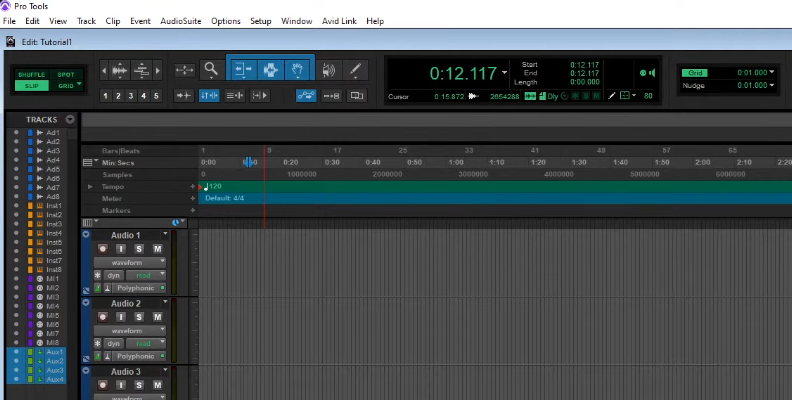
Key Features:
- 8 tracks each for audio (mono or stereo), soft instruments, and MIDI.
- 32-bit processing and up to 192 kHz sample rates.
- Numerous soft instruments and loops.
- Ships with 35 Avid plugins, including a compressor, EQ, filters, reverb, and delay.
Pros:
- Great introduction (for beginners) to music making with professional-grade DAWs.
- Familiar user interface based on paid versions of Pro Tools.
- Plenty of tutorials and support videos.
- Physical iLok not required (as with paid versions).
Cons:
- Limited track count with a maximum of four simultaneous inputs.
- No video or VCA tracks.
- Melodyne is not included (as with paid versions).
CakeWalk
CakeWalk by BandLab (previously known as SONAR) is a full-featured DAW that's been free since BandLab took over in 2018. With a history of over three decades in various forms, CakeWalk offers many of the features you'd expect in paid DAWs to help you produce music, including:
- Advanced editing, mixing, and mastering for both audio and MIDI.
- A comprehensive GUI with a clear layout that's customizable.
- Large collection of instruments and effects, including bass, drum kits, pianos, equalizers, compressors, and reverbs.
- Support for VST3 and ARA plugins with multi-touch capability.
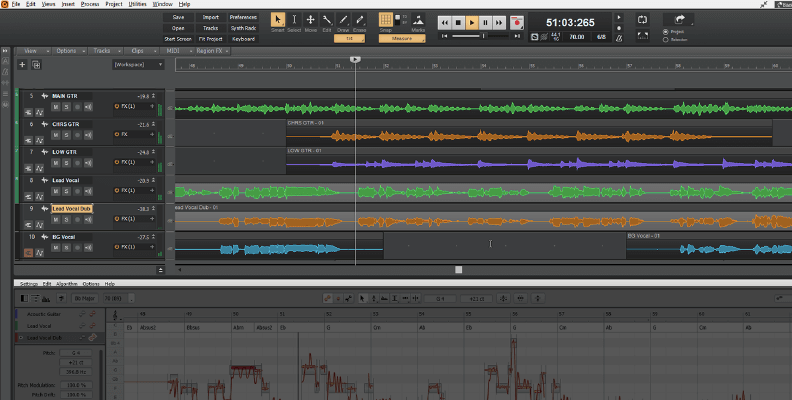
CakeWalk offers an expandable library of effects modules called ProChannel, giving you a highly capable selection, including:
- EQ, featuring the QuadCurve module with four distinct curves (including two SSL emulations) to help you find the right EQ for your job.
- Console and tape emulation for different types of audio editing and recording.
- Sonitus Effects Suite, with versatile multiband processing, delay, modulation, and vibrato effects.
- Reverb, filtering, and compression.
A unique feature of CakeWalk is its Quick Grouping facility—by holding down the CTRL key and moving a control, other instances of the control will move as well. This helps you adjust settings across two or more channels more consistently and easily.
Key Features:
- Unlimited tracks (i.e., audio, MIDI, loop, and auxiliary tracks).
- Full plugin support.
- ProChannel module for sophisticated effects and mastering.
- SkyLight user interface for highly customizable, efficient workflows.
Pros:
- Extensive feature set with a convenient Quick Grouping facility.
- Unlimited tracks—typically only available with paid DAWs.
- Versatile ProChannel effects modules and full VST3 support.
- High-resolution 64-bit audio engine.
Cons:
- Steep learning curve.
- GUI is a bit cluttered.
- Occasional stability issues (can be laggy at times).
Waveform Free

Waveform Free by Tracktion is a stripped-down version of Waveform's flagship paid DAW (Waveform Pro) with no time limits or restrictions on:
- Track count
- Exporting or rendering
- Third-party plugins
- Project saving
- Copyrights
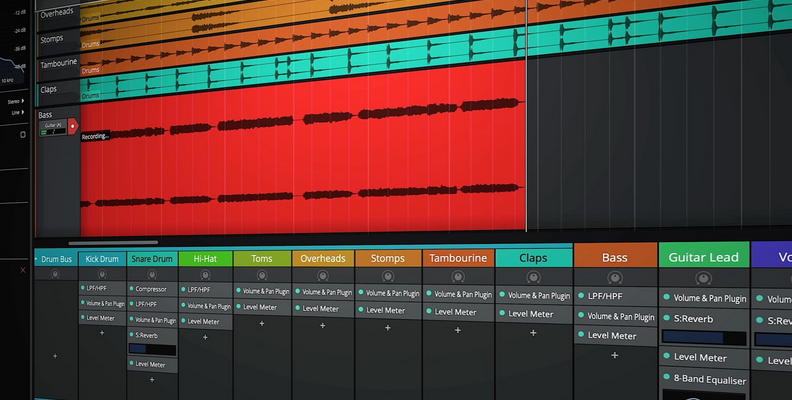
Waveform Free is a powerful free DAW that offers a range of professional-grade features and provides an all-in-one solution for recording, mixing, editing, and MIDI sequencing.
The GUI features a browser that lets you set tags, favorites, and smart lists.
There are several audio effects plugins, including a compressor, limiter, delay, distortion, reverb, phaser, and choices of EQ. There are also utility plugins, such as a spectrum analyzer and a mono conversion tool. Plugin racks are available for complex effects processing and sound design.
Waveform Free ships with a sampler, a (micro) drum sampler which you can use to produce your own drum machine, a digital synth (4OSC), and a loop rompler. An included pattern generator lets you easily generate chords, baselines, arpeggios, and melodies with a few clicks.
It's also easy to add pro-level expansion packs to Waveform Free by purchasing the modules that you need, e.g., the Recording Engineer Expansion pack for pro-grade recording and mixing tools or the MIDI Producer Expansion pack for additional instruments and a pro-level full MIDI editing suite.
Key Features:
- Intuitive GUI with plugin racks.
- Pattern generator for quick and easy composition.
- Full-featured DAW without restrictions on track count, exports, or plugins, making it ideal for audio editing.
- 21 built-in effects and utility plugins.
Pros:
- Unlimited tracks (audio and MIDI).
- Highly customizable and streamlined interface.
- Compatible with VST, VST3, and AU third-party plugins.
- Supports multitrack recording when used with an audio interface.
Cons:
- Streamlined GUI may not appeal to some.
- Steep learning curve given its rich feature set.
Magix Music Maker
Magix Music Maker is a DAW aimed at beginners to music production and has a simple and easy-to-use design. It comes in three versions: free, Plus, and Premium. The free version contains a limited set of features found in the Plus or Premium versions.
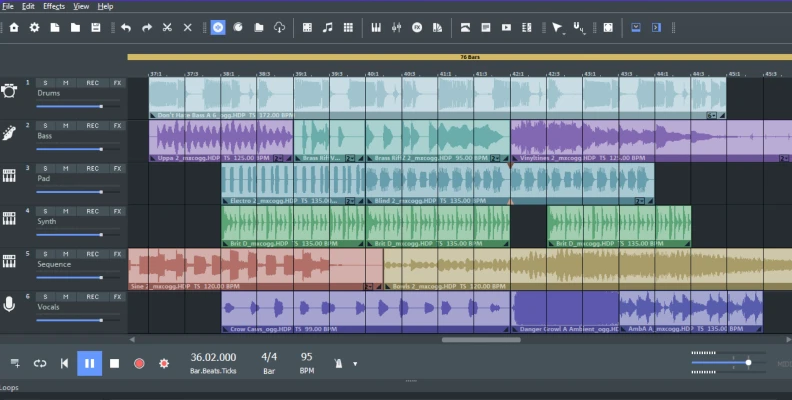
Music Maker uses a drag-and-drop interface for easy, fast, and flexible music making. Magix claims that you can get great results faster than any other DAW due to its simplicity.
Music Maker includes:
- Beat Box: Limited version of Beat Box Pro that's available with Magix's paid DAWs, allowing easy beat making for beginners.
- Song Maker: For easy creation of songs or sections of songs, albeit lacking the AI functionality found in the Premium version.
- Up to 8 tracks for recording MIDI, virtual, or physical instruments and voice.
- A basic MIDI editor.
- Rendering of completed projects.
Music Maker is a relatively simple DAW, but its ease of use means that it's versatile as a creative tool even for experienced music producers—you can quickly translate musical ideas into simple arrangements, so you'll be able to produce music with a minimum of fuss.
Key Features:
- 8 Tracks (MIDI, physical, or virtual).
- Simple, drag-and-drop functionality.
- 3 Instruments and 6 effects.
- 64-bit audio engine with multi-core support.
- Access to professional samples through Soundpools (free and paid).
Pros:
- Simple and easy to use.
- Intuitive drag-and-drop interface.
Cons:
- Limited usability compared to other free DAWs (a tradeoff for its simplicity).
- Lacking VST effects compatibility.
- Limited editing capabilities.
Audacity
Audacity is a versatile, open-source, cross-platform DAW. Being open source, it undergoes constant development by a community of volunteers and users.
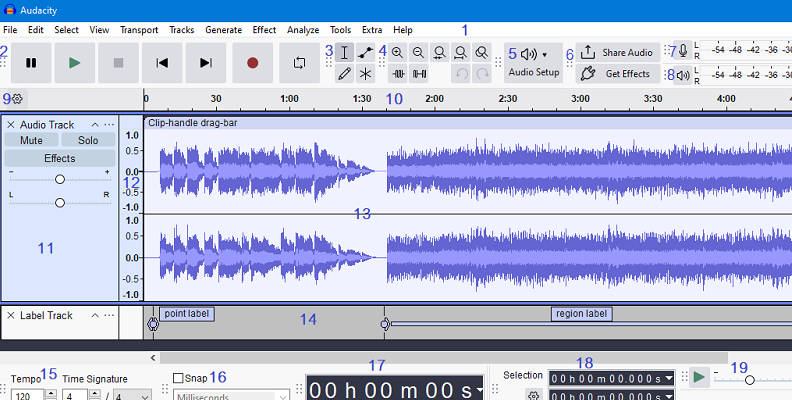
Audacity offers a range of features that you'd normally find in commercial DAWs. It works with audio recording data of up to 32-bit/384 kHz and has capabilities for audio recording, editing, mixing, and mastering.
Audacity's other capabilities include:
- 16-bit or 24-bit audio recording.
- Large library of effects, e.g., EQ (with preset curves), filters (high and low pass), compressor, phaser, and reverb.
- Ability to convert audio from a variety of file formats, with support for WAV, AIFF, AU, FLAC, MP3, and Ogg Vorbis.
- Versatile plugin support, including VST, VST3, AU, LV2, and LADSPA.
- Batch-processing facility.
Despite its rich feature set, Audacity is fairly easy to use and enjoys a long-standing community support group. Audacity was first introduced in 1999.
Key features:
- Full-featured audio recording editor.
- Support for several file formats.
- Support for various plugin formats.
Pros:
- Simple and easy to use, and a great all-around tool for audio editing.
- Minimum system requirements (works with many older PCs).
- Comprehensive range of recording and editing tools.
- Strong online community for learning (tutorials and guides) and support.
Cons:
- Limited feature set for more complex audio editing tasks.
- No MIDI tracks or MIDI editing capabilities.
- Destructive editing (i.e., you can't undo individual edits without losing the sequence of edits).
- No built-in soft instruments.
- Dated GUI.
MPC Beats
MPC Beats by Akai is a beginner-friendly DAW that's primarily designed for beat making but also has a full range of editing tools. Beats uses the Akai workflow that's been a feature of the MPC series of products since the 1980s.
The interface has a 4x4 grid for triggering drum samples (i.e., 16 pads), a piano roll, and an edit window. There's also a sample library browser giving you access to over 2 GB of samples from the popular MPC Expansion Pack.
There are three plugin instruments—Bassline, Tubesynth, and Electric—each with an array of sound-shaping options. There's also support for external VST or AU instruments and effects plugins. Beats pairs well with a range of MIDI controllers, particularly Akai's MIDI or pad controllers.
A unique feature of Beats is that you can use it as a plugin itself—plug it into your favorite DAW and access all of MPC's functionality at your fingertips.
Key Features:
- 8 MIDI and audio tracks.
- A large range of drum samples and effects, with additional built-in instruments and VST/AU plugin support.
- Full-featured editing suite.
- Interface design based on popular MPC hardware.
- Can be used as a VST plugin with other DAWs.
Pros:
- Compatible with a wide range of MIDI controllers.
- Versatile VST plugin features allow use with other DAWs.
Cons:
- Specialized for beat making and may not suit other forms of audio production.
- Interface layout and workflow may be confusing for those not familiar with MPC hardware.
- Limited number of MIDI and audio tracks can make audio editing cumbersome.
FL Studio (Free Trial of Paid DAW)
Image Line's FL Studio isn't a free digital audio workstation — it's a full-featured, paid music production software. However, you can access FL Studio on a free trial without any time limits, so it's worth a mention. There are some important restrictions, however, that you should be aware of when you use FL Studio in this way:
- You can't open saved projects in FL Studio, i.e., once you save your project, you can't open it again, and you can't open projects created by others.
- There's limited technical support.

Being a paid DAW, FL Studio has a comprehensive feature set and extensive capabilities, including:
- Unlimited audio, instrument, and MIDI tracks.
- 60 effects, 40 soft instruments, and 1 GB of bundled content.
- Separate interfaces for creating, mixing, and arranging music.
- Access to several pro-quality synths.
- Excellent for loop and pattern-based MIDI composition.
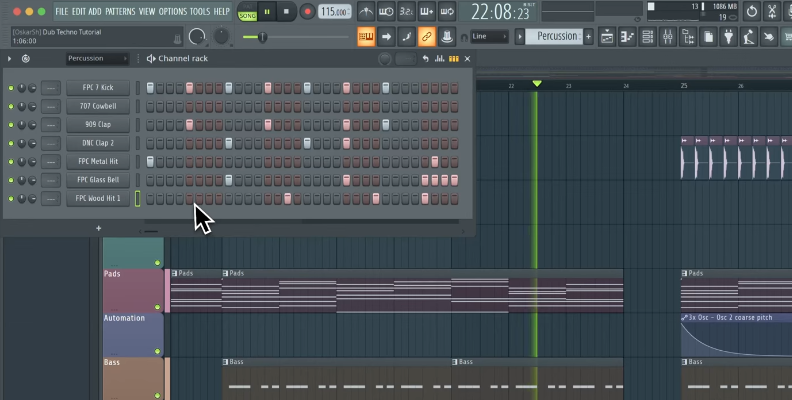
FL Studio is well-suited for producing electronic music, such as BDM or beats, and the origins of FL Studio go back to 1998 when it was first introduced as a MIDI step-sequencer.
While not directly comparable to the other free DAWs we've discussed, FL Studio is worth considering if you can work within the restrictions applying to the (free) trial version.
Things to Consider Before Using Free Music Production Software
With the list of capable free DAWs that we've considered, you may be ready to jump straight into one of these amazing music creation tools.
Although they're free, each music production software tool takes time and effort to learn and to integrate into your workflow, i.e., it's a significant investment in non-monetary terms. So, it's worth thinking through the following considerations before you get started:
- Your skill level—if you're a novice, consider starting with a digital audio workstation that's more intuitive to learn and use (such as Ableton Live Lite, with its non-linear Session View). Otherwise, you may need to invest significant time into learning the DAW's ecosystem.
- System requirements—check that your computer setup is compatible with the DAW's requirements, keeping in mind the paid versions of the DAW as well, should you choose to upgrade in the future.
- Feature set—as mentioned, don't expect the same features as paid versions of the DAW, so prioritize the features included in the free versions that are most relevant for you.
- Future growth—think about your long-term goals so that you can start with a DAW that has paid versions with the features and capabilities you want in the future.
- Support—check out the support that's available for the digital audio workstation and the strength of the user community, as all else equal, the more support the better, especially if you're a novice.
Conclusion
GarageBand is a versatile and extremely capable music creation tool that's absolutely free, but it only works with Mac or iOS platforms. If you're a Windows user looking to get started with music production, you'll need to deploy a virtual machine or find alternative DAWs.
In this post, we've listed the best free GarageBand alternatives for you to create music on Windows. Whether you're just dabbling or setting up a full home recording studio, there's something for everyone.
Although free, the DAWs we've considered are extremely capable and make it easy to produce studio-quality audio, whether you're a seasoned professional or just starting out in the music industry.