 Marco Sebastiano Alessi |
June 30, 2026
Marco Sebastiano Alessi |
June 30, 2026


Today, we’ll explore and learn about linear phase EQ, a type of EQ that can help you avoid and fix phase issues to achieve better and cleaner mixes. Because there is no single tool to fix all problems, we’ll also discuss some disadvantages of using linear-phase equalizers and why you shouldn't uninstall and throw away your current EQ.
Let’s dive in!
What is Linear Phase EQ?
A Linear Phase EQ is a specialized digital equalizer that changes the magnitude of frequencies without shifting their phase relationship. In standard "minimum phase" EQs, boosting or cutting a frequency causes a slight timing shift (phase distortion) at that specific frequency. Linear phase EQ avoids this by delaying the entire audio signal equally, ensuring all frequencies stay perfectly aligned.
Equalizers are great tools for fixing and shaping the tone of audio signals, but the slight delay that a regular EQ, even an analog EQ, adds can cause phase issues when all tracks in your mix are playing together, which can sound smeared. When you use linear phase EQs, they delay all bands equally, avoiding smearing.
Like many audio tools, a linear phase EQ can ruin your mix if it’s not used correctly or when it is not needed. Here’s a brief list of situations where linear phase EQ is a better option.
Mastering.
Parallel processing.
Multi-mic drums.
Stereo tracks.
Difference Between Linear Phase EQ and Minimum Phase EQ?
The main difference is how they add delay to the audio signal. Minimum phase EQ slightly delays only the specific frequency bands you are filtering, while linear phase EQ adds delay to all frequencies simultaneously.
While minimum-phase filters introduce phase-shifting issues, linear-phase EQ can introduce another artifact called pre-ringing. Sometimes you have to decide which of the two issues sits best in your mix.
Color and sound are other differences. Many minimum phase EQs are preferred for their colorful sound. A linear phase EQ sounds crisper and cleaner, but its neutrality can feel off or unnatural. However, this may be subjective. Always trust what you hear and choose what you like.
How to Use Linear Phase EQ
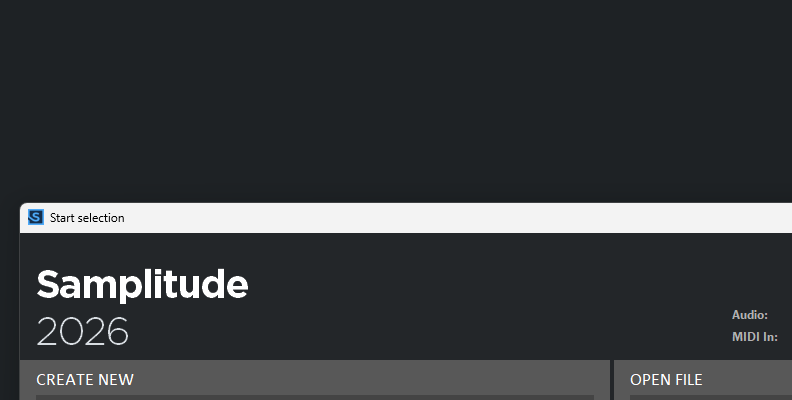
I’ll show you how to use linear phase EQ in Samplitude 2026.

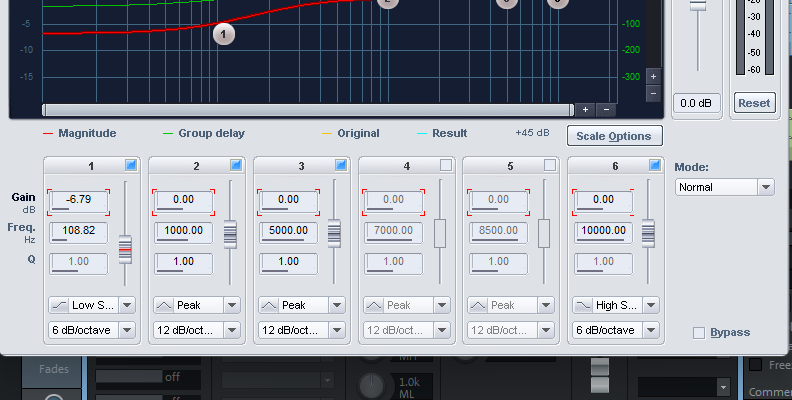
Your main tool is the stock plugin EQ116. A 6-channel fully parametric EQ that features a linear phase mode, allowing you to alternate between minimum EQ and linear phase EQ without requiring external equalizers.
Remember, you can follow our guides with the free Samplitude trial.
Step 1: Open Project
Open a project that presents phase issues and identify the tracks causing them.
Step 2: Add EQ116 Plugin
Select the track, then click an empty slot in the plugin section to open the plugin browser.
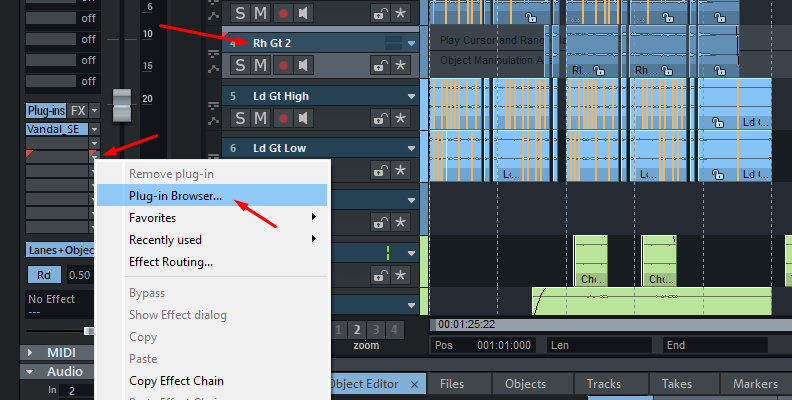
Remember, you can add plugins from the track header, the track editor, or the mixer (press M to enable it). You can also add plugins to individual objects by double-clicking one to open the object editor, then going to the FX tab and clicking an empty slot in the plugin column.
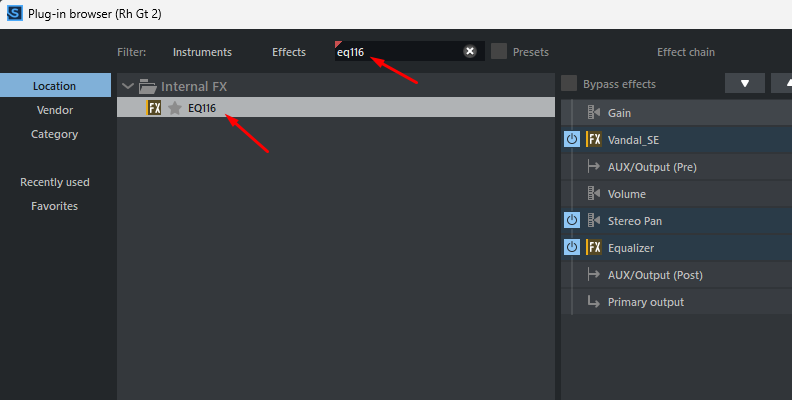
In the plugin browser, search for EQ, then double-click EQ116 to add it to the track or object.
Step 3: Select the Linear Phase Mode
Locate the Mode dropdown menu on the right side of the UI, next to the sixth band, and change it to Linear phase.
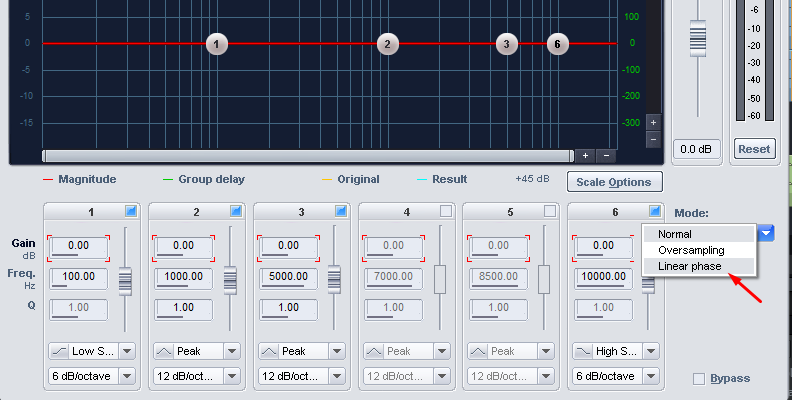
EQ116 offers three working modes:
Normal: uses a minimum-phase EQ. It’s your typical EQ tool.
Oversampled: uses a higher sample rate than normal to achieve a more precise frequency response at higher frequencies. But it uses more CPU resources.
Linear phase: the EQ operates without frequency-dependent phase shifts, using a different algorithm than the other two modes.
Step 4: Adjust the EQ Curve
Adjust the frequency bands in the EQ graphic by clicking and dragging the circles, and adjust the bandwidth (Q) with the mouse wheel.
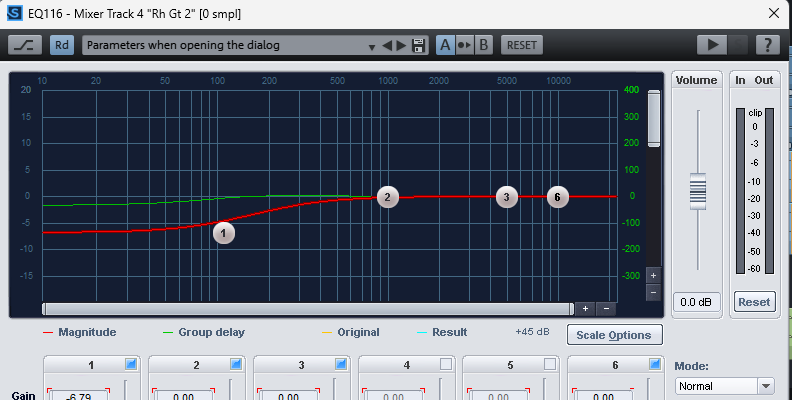
Alternatively, use the input fields for Gain, Frequency, and Q below the graphic. Select a field and drag the mouse, use the wheel mouse, or the slider next to the parameters, or type to adjust the values.
Step 5: Linear Phase Considerations in Samplitude
Watch out for pre-ringing when making steep cuts at low frequencies in linear phase mode. If this happens, you can just switch back to the Normal mode or reduce the Q settings.
The Group delay line (the green one) should remain flat to confirm that no phase shifts are introduced into the signal.
Remember that in Samplitude, you can apply the EQ to an object rather than the whole track. This can help you reduce the CPU load.
Main Disadvantages of Linear Phase EQ?
Linear phase EQs are not a magic tool that will solve your problems. The truth is, you can mix entire albums and never need to use one. There are also drawbacks to using linear phase EQs that you should be aware of.
Heavy CPU usage: linear phase EQ uses a high amount of CPU resources. Especially when used in multiple instances. Many audio mastering engineers prefer to reserve it for mastering or busses.
Latency: Because linear phase EQ requires heavy CPU processing, it can add additional latency to your DAW.
Digital sound: The extremely neutral and transparent sound can come as digital, cold, and artificial, or lacking character.
Pre-ringing issues: It is the most common artifact caused by linear phase EQ, which creates an echo or reverberation just before a sharp transient. This usually becomes a problem with higher Q values and steeper filters.
Final Words
Every tool in audio production has its uses; while some may be like Swiss army knives you want to keep on hand all the time, others can have very specific uses. Linear phase EQ falls into the latter category. You want to have one in your audio toolbox in case you need it, because, when used properly, a linear phase EQ can help improve your mixes and avoid phase issues. Experiment with it, listen and learn how it can make a difference in your mixes, and most importantly, when not to use it.
Good luck!
FAQ
Should I always use linear phase EQ?
The short answer is no. A common misconception is that a linear phase EQ is better than a minimum phase EQ. But the truth is that phase issues from minimum EQ are rarely noticeable with low to moderate filtering and only become problematic in certain scenarios. It’s good knowing how phase issues can affect your sound and that linear phase EQ is an option to avoid them if needed, but also remember that linear phase EQ has its disadvantages, especially pre-ringing.
What is a linear phase fabfilter?
It refers to a linear phase mode in the plugin FabFilter Pro-Q3 that lets you switch between standard EQ and Linear Phase EQ on a per-session or per-band basis. It also features different resolutions, which affect the latency added to your project.