 Bojan Veselinovikj |
January 29, 2026
Bojan Veselinovikj |
January 29, 2026


When people listen to music today, they often expect it to feel like one continuous experience rather than a collection of separate files.
Whether you are enjoying playlists on Spotify, watching a DJ set on YouTube, or editing a recording on a computer, the way songs connect to each other matters. Abrupt gaps or sudden silence between tracks can break immersion and pull the audience out of the moment. This is where crossfade comes in.
Over time, this technique has evolved from simple analog tricks to advanced digital crossfading tools that allow creators to blend audio smoothly. Understanding how crossfade works, where it came from, and how to use it properly can enhance listening, improve mixes, and help create a more polished final result.
This guide is all about crossfading in music, so without further ado, here's what you need to know.
What is Crossfade in Music?
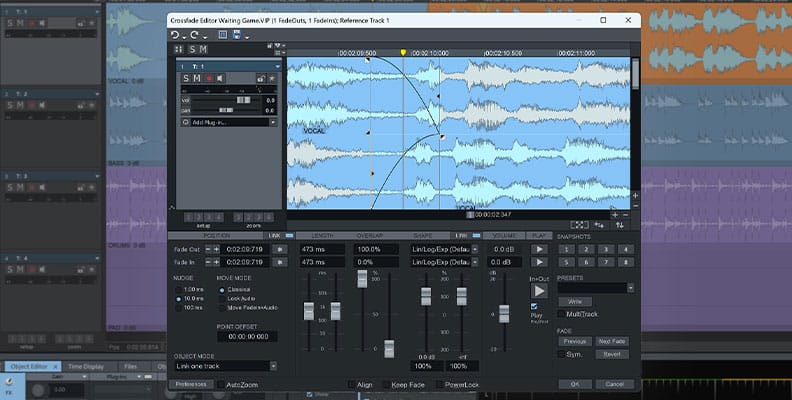
In music, a crossfade is an audio method that produces a fluid, uninterrupted transition between two tracks or sound clips by overlapping them, as the opening track fades away while the following track gradually fades up, preventing silence or harsh edits and preserving momentum. It’s vital for DJs, curated playlists, and music production to create a continuous listening journey, helping mixes feel cohesive instead of sounding like isolated songs independent
Historically, crossfading did not start as a digital process. In the analog era, engineers used physical controls on mixers and tape machines. Some setups even relied on three cassette decks to manually cross between sources. Today, the same idea exists in digital form, but with far more precision. Whether you are mixing music, editing audio for a post, or just enjoying gapless playback, crossfade helps eliminate noticeable breaks.
How Crossfade Works
At its core, crossfade works by adjusting volume levels over time. One track begins to fade out while the other starts playing at a low level and increases in volume. During this overlap, the two sections coexist, allowing the ear to adjust naturally. This overlap is key to avoiding harsh transitions or sudden drops in sound.
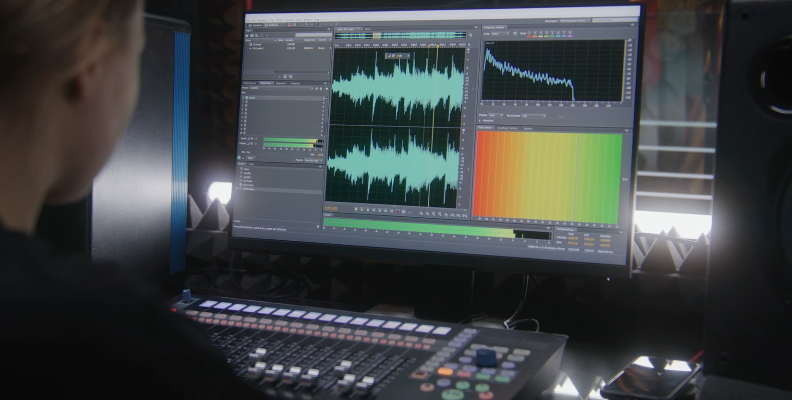
In digital environments, the process is visualized using a waveform. Editors can see where the beginning of one track meets the end of another and adjust the fade curves accordingly. You can set how long the cross should occur, whether it is a short bit or a longer blend. Some tools use a linear fade, while others allow more complex curves to match the feel of the music. The goal is always the same: eliminate gaps, reduce silence, and make the transition feel intentional.
Types of Crossfades
There are several types of crossfades, each suited to different situations. A linear crossfade is the most basic, where one track fades out evenly as the other fades in. This is often used in simple playlists or automated players. Equal-power crossfading is designed to keep the perceived loudness consistent, which can help avoid volume dips during the transition.
Another type involves creative crossfading, often used by a DJ to mix songs live. Here, the cross is part of the performance, sometimes emphasizing rhythm or harmony. In this case, two sections may overlap significantly, creating a temporary mix of two tracks. Some producers even experiment with crossfading as a compositional technique, blending sounds to create new textures.
There is also digital crossfading used in editing and post-production. This focuses on clean results rather than performance. It is commonly used to join dialogue, audio clips, or music beds without the listener noticing where the cut occurs.
Best Tools Used to Crossfade Music
When it comes to choosing tools, there are many options depending on your goals and experience level.
Samplitude by Boris FX for Audio Editing

The first option is Samplitude by Boris FX. Samplitude is known for its powerful audio editing and mixing capabilities, making it a favorite among professionals. Samplitude's crossfade editor allows precise control over crossfade settings, letting users adjust curves, overlap length, and timing with a simple slider.
The software is ideal for recording, editing, and creating seamless transitions between tracks. Its flexibility makes it helpful for both music production and detailed audio work.
Like every other Boris FX tool, you can download a free version of Samplitude and try it before purchasing a license.
Spotify for Listening

Another popular option is Spotify itself, which includes built-in crossfade settings for listening. While it is slightly different from the other examples on this list as it's not an editing tool, it allows users to set a crossfade duration between songs, improving playback for playlists. This feature is designed for casual listening and helps eliminate gaps without requiring technical knowledge.
If you're going to use Spotify to listen to music yourself or play some at a party, its built-in crossfade feature will ensure there aren't any abrupt pauses or starts/endings when it's time to switch a track. It doesn't require any production skill or knowledge, and you can configure the length easily in the settings panel.
Virtual DJ for Live Mixing

A third option is DJ-focused software like Virtual DJ or similar platforms. These tools are designed for live mixing and allow performers to cross between tracks in real time using a dedicated crossfade control. They offer visual waveforms, cue points, and adjustable fade behavior, helping the DJ align timing and energy between songs.
Because the transition happens through controlled overlap rather than silence, this approach makes it easier to mix tracks smoothly and maintain consistent sound during live play or practice sessions on a computer.
Final Words
A Crossfade may seem like a small detail, but it plays a significant role in how music is experienced. From its analog history to modern digital workflows, the technique has continued to evolve. Whether you are a listener who wants smooth playback, a DJ who wants to enhance a mix, or an editor working on a recording, understanding crossfading is valuable.
By learning how crossfading works, experimenting with different types, and using the right tools, you can create transitions that feel natural and intentional. A well-executed crossfade helps music flow, keeps the audience engaged, and turns separate tracks into a cohesive experience. In a world full of audio content, these small details often make the biggest difference.
FAQ
When should you use a crossfade?
Crossfades can be used in many different ways. It's a tool in your arsenal as a creator. You can use it briefly to hint which song is coming up next and prepare the crowd or see their reaction, or you can use it to create smooth yet exciting transitions from one song to another to avoid awkward silence. Crossfades are also used in sound engineering to blend in different Foley sounds, etc.
What is a crossfade explained quickly?
Crossfade in music is a technique where one track gradually fades out while another track fades in, creating a smooth transition between two tracks. Instead of switching songs instantly, both sounds overlap for a short period, so the listener hears one sound turning into another. The goal is to make multiple songs feel like one piece rather than separate elements. This cross fade approach is common in DJ performances, playlists, albums, and even casual listening apps.