S_PixelSort
Description
Sorts pixels exceeding a threshold along lines arranged in various patterns, including parallel lines, lines radiating from a central point, and circular lines.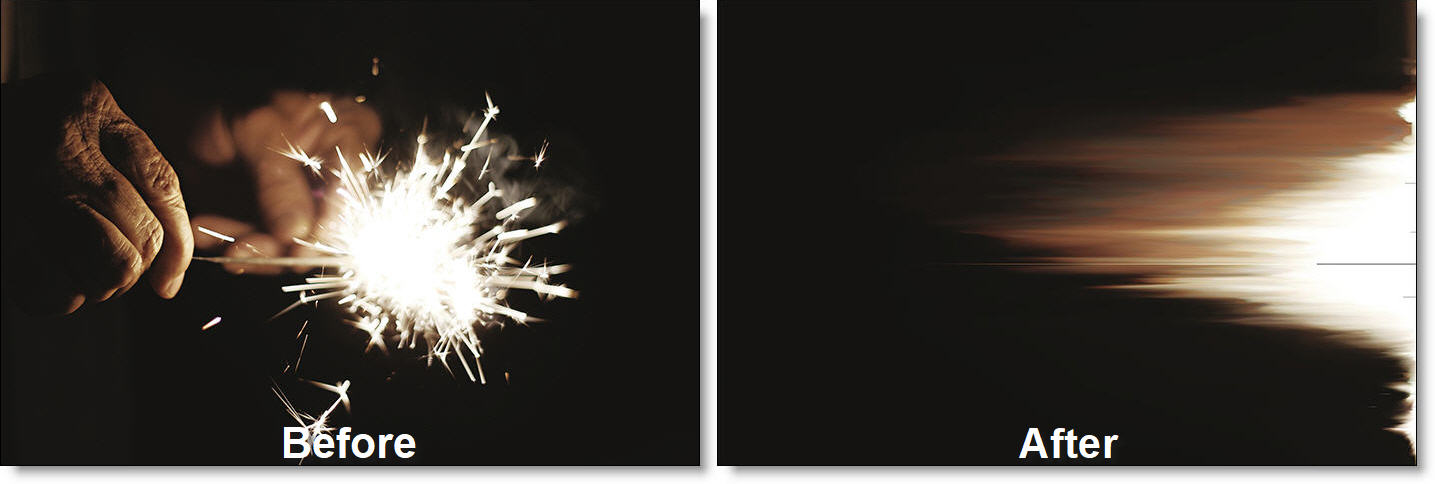
The S_PixelSort filter comes from the Emmy award winning Boris FX Sapphire filter set.
Category
Stylize.
Controls
Presets
To select a preset, pick one from the Presets window.
Sort Angle
The angle used to sort parallel lines in Linear mode.
Center
The center point used in Radial mode.
Start Angle
The starting angle for sorting in Radial mode.
Degrees Sorted
The number of degrees around the center to sort in Radial mode.
Inner Radius
The radius of unsorted pixels around the center in Radial mode.
Ray Length
The length of sorted pixel segments in Radial mode.
Vary Radius
The amount of variation applied to the starting pixel of each radiating line in Radial mode.
Start Angle
The starting angle for sorting in Circular mode.
Degrees Sorted
The number of degrees around the center to sort in Circular mode.
Circle Center
The center point of the concentric circles in Circular mode.
Vary Start
The amount of variation applied to the starting point in Circular mode.
Inner Radius
The minimum circle radius to sort in Circular mode.
Thickness
The number of concentric circles sorted in Circular mode.
Threshold
The threshold that determines which pixels are sorted; only pixels on one side of this value will be affected.
Sort Direction
Determines whether pixels above or below the threshold are sorted.
Sort below threshold
Sorts pixels with values lower than the threshold.
Sort above threshold
Sorts pixels with values higher than the threshold.
Reverse Sort Direction
Determines whether pixels are sorted in ascending or descending order.
Sort Type
Determines how pixel colors are analyzed for sorting.
Monochrome
Sorts pixels based on their monochrome values.
Average
Sorts pixels based on the average value of their color channels.
Minimum
Sorts pixels based on the smallest color channel value.
Maximum
Sorts pixels based on the largest color channel value.
Red
Sorts pixels using their red channel values.
Green
Sorts pixels using their green channel values.
Blue
Sorts pixels using their blue channel values.
Hue
Sorts pixels according to their hue values.
Saturation
Sorts pixels according to their saturation levels.
Brightness
Sorts pixels according to their brightness levels.
Randomly Restart Sort
Controls how frequently the sorted pixel chunks are broken up.
Soften Threshold Mask
Blurs the mask created by the image threshold to produce smoother transitions.
Downsample
Reduces the output resolution according to the Sort Resolution setting when enabled.
Sort Resolution
Specifies the target output resolution (in pixels) used when Downsample is enabled.
Seed
Sets the initial seed value for the random number generator that drives sort restarts.
Mix With Source
Blends the sorted image with the original source image.
Show
Selects which output to display.
Result
Displays the final pixel-sorted image.
Raw Sort Values
Displays the underlying values used for sorting pixels.
Threshold Mask
Displays the mask of pixels selected for sorting based on the threshold parameter.
Random Restart Noise
Displays the pixels that trigger sort line restarts.
Combined Threshold Mask
Displays the threshold mask combined with the input mask when Apply Mask is set to Mask Threshold.
Soft Borders
When enabled, adds transparent borders to the input image before processing. This allows soft edges beyond the original frame. When disabled, the effect is constrained within the image frame, preserving a hard border at the edges.